
Trying to explain Cwallet to someone unfamiliar with it is a bit awkward. It’s a custodial wallet. Also a non-custodial wallet. It has a Telegram bot that community managers use to run airdrops, a bulk payment tool for businesses, and an invoice generator. All of this, in a single free app, across iOS, Android, and desktop web.
Whether that’s impressive or just confusing depends on what you actually need. This Cwallet review is an attempt to separate the genuine strengths from the features that sound good on paper and matter less in practice — and to be direct about what the hybrid security model actually asks you to trust.
Quick specs
| Wallet type | Hybrid: custodial + non-custodial in one app |
| Key custody (custodial) | MPCC — keys split across distributed servers, never whole in one place |
| Key custody (non-custodial) | User-held — standard BIP39 seed phrase (12 or 24 words) |
| Secure element | None — software wallet only, no hardware chip |
| Supported assets | 800+ tokens, 50+ networks: BTC, ETH, BNB, SOL, TRX, TON, DOGE, all ERC-20 |
| Service fees | Zero — no swap, deposit, or internal transfer fees; network fees apply |
| Apps | iOS, Android, desktop web — no browser extension |
| Social bots | Telegram (@Cwallet_com_Bot), Discord, Twitter/X |
| Business tools | Bulk payment, invoice, tip code, payment button |
| Price | Free |
Two wallets in one app — and why the distinction matters
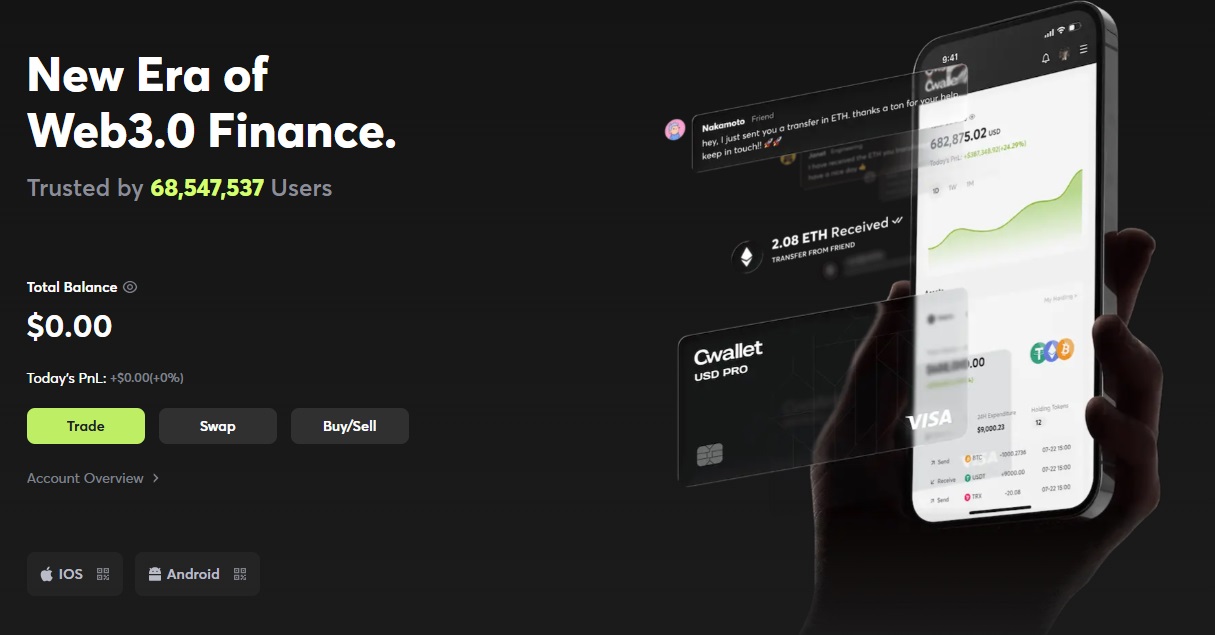
Cwallet‘s headline feature is something no other major wallet offers: custodial and non-custodial modes coexisting in the same app, with separate balances and separate security models. You switch between them with a single tap.
Custodial mode is where most new users will start. No seed phrase, no technical setup — just an email account and a password. If you lose your phone, you log back in from another device. It works like a PayPal balance in terms of friction, which is genuinely useful for beginners who have never managed a seed phrase before and frankly shouldn’t have to on their first day.
Non-custodial mode is the standard self-custody experience. You activate it separately, generate a 12 or 24-word BIP39 seed phrase, write it down, and Cwallet never touches it again. From that point, it behaves identically to MetaMask or Trust Wallet — your keys, your funds, your responsibility if the phrase is lost.
In practice, the sensible approach is to use custodial mode for day-to-day spending, tips, and the kind of small active balances you’d normally keep on an exchange — and non-custodial mode for larger holdings, DeFi, or anything where full control matters. Most people reading this will land on one or the other based on how much they care about self-custody. But having both available without switching apps is more useful than it sounds.
Security: MPCC explained, with its actual caveats
MPCC stands for Multi-Party Cloud Computing. The idea: your private key is never stored as a complete object anywhere. Instead, it’s split into encrypted fragments distributed across multiple separate servers. When you need to sign a transaction, enough fragments come together momentarily to produce the signature, then separate again. No single server — including Cwallet’s own — ever holds the full key.
That’s a meaningful security architecture. It eliminates the most common failure mode of custodial wallets, where one compromised server or one rogue employee can drain accounts. An attacker who breaches one server gets a fragment that’s mathematically useless without the others.
But here’s what’s worth knowing before you commit significant funds to custodial mode: there’s no publicly available third-party audit of Cwallet‘s MPCC implementation. Established MPC providers like Fireblocks and Cobo publish cryptographic methodology and independent audit reports. Cwallet describes the architecture on its website but hasn’t released equivalent documentation. The design is sound in principle — the problem is you can’t verify the implementation independently. That’s a trust gap worth naming.
Outside of MPCC, the security stack is solid: mandatory 2FA on all accounts, biometric login on mobile, and end-to-end encryption on transaction data. Standard features done properly.
Security by wallet mode
| Private keys — custodial | Held via MPCC (distributed, never whole); no seed phrase issued |
| Private keys — non-custodial | Held entirely by user; BIP39 seed phrase, standard self-custody |
| Secure element | None — software wallet; no hardware chip protection |
| PIN / passphrase | Account password + mandatory 2FA; biometric login on mobile |
| Independent audit | Not publicly confirmed as of June 2026 |
Seed phrases, recovery, and what happens in the bad scenarios
Non-custodial mode works exactly as you’d expect. Lose your phone — restore from seed phrase on any BIP39-compatible wallet. Lose the seed phrase — permanent loss, no recovery path, no support ticket that helps. Same rules as every self-custody wallet that exists.
Custodial mode is where the risk model diverges. There’s no seed phrase because the key fragments are held by Cwallet’s infrastructure. Recovery is account-based: email, password, 2FA. Lose your phone, get it back from any browser. Forget your password, reset it. Straightforward — unless Cwallet itself becomes unavailable.
If the platform goes offline temporarily, you can’t access custodial funds until it’s back. If it’s hacked at scale, or if the company shuts down, the recovery path for custodial funds is tied entirely to whatever Cwallet provides. There’s no independent fallback. That’s the honest trade-off behind the convenience, and it’s the same risk you accept with any exchange balance.
Platform risk — important for custodial mode users
Assets in custodial mode depend on Cwallet’s continued operation. There is no seed phrase you can use independently if the platform becomes unavailable. Treat custodial balances like an exchange account — useful for active amounts, not appropriate for long-term storage of significant holdings.
Setup and everyday use
Getting started takes under five minutes. Sign up with an email address or Google account, and custodial mode is active immediately — no seed phrases, no wallet addresses to copy, nothing technical. If you want non-custodial mode, you activate it as a second step through the settings, which triggers the seed phrase generation flow.
For someone switching from Coinbase or Binance, this will feel instantly familiar. For someone coming from MetaMask expecting a browser extension, it won’t — Cwallet is mobile and web only, with no desktop browser integration. That gap matters for DeFi users who rely on connecting wallets directly to protocols in a browser tab.
The swap interface has one genuinely clever feature worth calling out: Bulk Swap. Instead of selling eight different tokens one at a time to consolidate into USDC, you select all of them, pick a target token, and execute in a single transaction. For anyone who’s accumulated a pile of airdrop tokens they want to clean up, this alone saves a meaningful amount of time and gas.
Supported assets and compatibility
| Major chains | Bitcoin (incl. Lightning Network), Ethereum, BNB Chain, Solana, Tron, TON, Dogecoin, Polygon |
| Token standards | ERC-20, BEP-20, TRC-20, SPL — all EVM-compatible tokens |
| DeFi | Via non-custodial mode; dApp access through mobile in-app browser |
| NFTs | Not a current focus; no dedicated NFT management interface |
| Desktop | Any browser — Windows, macOS, Linux |
| Mobile | iOS and Android, full feature parity |
| Browser extension | Not available |

Cwallet
Fees: zero service fees, and what that actually means
Cwallet charges nothing on swaps, deposits, or internal transfers — no service fee, no percentage taken on exchange rates. What you do pay is the blockchain network fee, which goes to miners or validators, not to Cwallet. On Ethereum this can be significant during busy periods; on Solana or BNB Chain it’s negligible.
To put it in concrete terms: MetaMask charges 0.875% on every token swap. On a $1,000 swap, that’s $8.75 before network fees. Cwallet charges nothing on top of the best available rate. For users who swap regularly, that difference compounds quickly.
Cwallet routes swaps through a CEX and DEX aggregator to find the best available price. The default slippage tolerance is set to 0.5%, which is a reasonable balance between price protection and transaction success rate — and it’s adjustable.
The Telegram and Discord bot
Most Cwallet reviews skip this section entirely, which is strange because for a specific type of user it’s the main reason to use the platform at all.
Add @Cwallet_com_Bot to a Telegram group as admin, link your Cwallet account, and you can run crypto tips and airdrops directly in the chat. The command structure is simple enough: /tip 1 USDT @username sends a dollar of USDT instantly. /airdrop 10 USDT 20 splits ten USDT among the first twenty people who respond with “grab.” Four airdrop types exist — standard equal split, rain (targets recently active members automatically), draw (random allocation), and giveaway — each serving a different community engagement goal.
A project doing a token launch could run a rain airdrop to reward active community members without any manual work. The bot handles participant selection, distribution, and confirmation. Nothing to pay for the service itself — only whatever network fee applies to the tokens being distributed.
Business tools
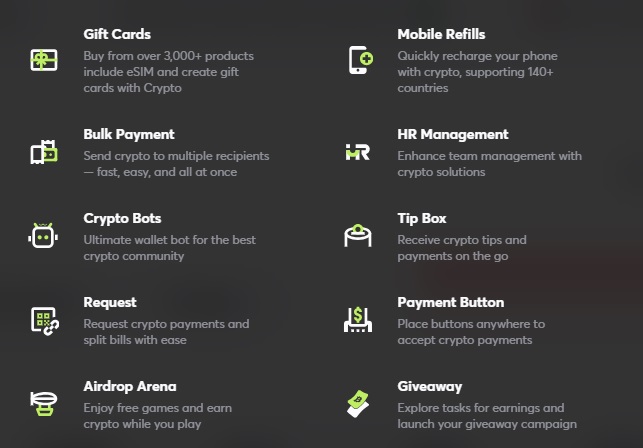
Bulk payment lets you send crypto to multiple addresses at once. Upload a recipient list, specify the token and amounts, execute. For an investment firm paying out quarterly returns in USDT, or a startup paying contractors across five countries, the alternative is sending transactions one by one — which is what everyone else is doing on competing wallets because no equivalent tool exists.
The invoice tool generates a shareable crypto payment request with a specified token and amount. The payment button embeds on a website. The tip code is a QR that a creator can drop in a YouTube description or print on a physical sign — viewers tip in any supported token, no account required on their end.
Risks worth naming before you commit
Cwallet is a software wallet, so supply chain attacks aren’t a relevant concern here — there’s no physical device that can be tampered with before shipping. But download source matters. Use cwallet.com or the official iOS and Android app stores only; third-party APK downloads are a phishing vector.
Losing your device in non-custodial mode is recoverable as long as you have the seed phrase. Losing the seed phrase is not. In custodial mode, losing your device is a password reset. Both scenarios are manageable — what’s less manageable is losing access to your email account while also forgetting the Cwallet password, which would strand custodial funds until identity verification resolves it.
The MPCC audit gap deserves a repeat mention here: for anyone holding more than a few hundred dollars in custodial mode long-term, the absence of a published audit is a genuine consideration, not a technicality. It doesn’t mean the wallet is insecure. It means you’re making a trust decision without independent verification to back it up.
Cwallet vs Trust Wallet vs MetaMask
| Cwallet | Trust Wallet | MetaMask | |
|---|---|---|---|
| Self-custody option | Yes — non-custodial mode | Yes — always | Yes — always |
| Custodial option | Yes | No | No |
| Swap service fee | None | Spread added | 0.875% |
| Browser extension | No | Yes | Yes |
| Social / community tools | Telegram, Discord, Twitter bots | None | None |
| Business tools | Bulk payment, invoice, tip code | None | None |
| Beginner friendly | High — custodial mode | Medium | Medium |
Pros and cons
Verdict
Our assessment
Most wallets do one thing and do it well. Cwallet is trying to do several things at once, and it mostly pulls it off — though not equally well across all of them.
The custodial mode is a genuinely good entry point for new users. Zero-fee swaps are a real financial advantage that compounds for anyone who trades regularly. And the Telegram bot occupies a space no other wallet competes in — community managers don’t have a better option for running in-chat airdrops at this level of simplicity.
Where it asks more of you: trusting an unaudited MPCC implementation for custodial funds, accepting a mobile-only DeFi experience, and relying on a platform that’s younger and less battle-tested than the wallets most people default to. None of those are dealbreakers, but they’re worth weighing against what you’re getting.
Cwallet makes the most sense for beginners who want a gentle on-ramp, community managers running regular airdrops, traders who want to stop paying swap fees, and small businesses that need crypto payment infrastructure. If you’re a self-custody purist or a heavy DeFi user who lives in a browser extension — look elsewhere.
FAQ
Is Cwallet safe?
Non-custodial mode carries the same risk profile as any self-custody wallet — your seed phrase is the only thing to protect. Custodial mode uses MPCC to distribute key fragments across servers, so no single breach exposes complete keys, but there’s no published third-party audit to independently verify the implementation. Don’t keep large long-term holdings in custodial mode if that matters to you.
Does Cwallet give you a seed phrase?
Only when you activate non-custodial mode. The app generates a standard 12 or 24-word BIP39 phrase and shows it once — write it down before closing that screen. Custodial mode has no seed phrase by design; if you lose access, you recover through your email account instead.
What fees does Cwallet charge?
No service fees on swaps, deposits, withdrawals, or internal transfers. Blockchain network fees still apply and go to validators, not to Cwallet. MetaMask charges 0.875% on token swaps; Cwallet adds nothing on top of the best available rate from its aggregator.
How does the Telegram bot work?
Invite @Cwallet_com_Bot to your Telegram group and grant it admin permissions. Log into Cwallet via your Telegram account, fund the custodial wallet, and commands like /tip, /airdrop, and /rain work directly in chat. No per-use fee — only the network cost of whatever you’re distributing.
Can I use Cwallet for DeFi?
Yes, through non-custodial mode on the mobile app — activate it, which generates a seed phrase and gives you direct blockchain control, then connect to dApps through the in-app browser. There’s no browser extension, so protocols that specifically require MetaMask’s desktop extension won’t connect directly.