

Sparrow is a free, open-source Bitcoin desktop wallet made by Craig Raw, funded through donations and supported by OpenSats. That last part matters, because it tells you something about who this is built for. There is no company monetizing your data here, no premium tier, no upsell. Just a wallet designed around one idea: that you should know exactly what your Bitcoin is doing at all times.
This sparrow wallet review is for people who are seriously considering it, not just curious about it. So the limitations get equal space as the strengths.
Sparrow Wallet Review
Before anything else: Sparrow used to include Whirlpool CoinJoin, a mixing feature connected to Samourai Wallet. When U.S. authorities arrested Samourai’s founders and seized their servers in April 2024, Sparrow pulled the integration entirely in version 1.9.0. The privacy tools it still has are covered further down.
Sparrow Wallet at a Glance
Type Desktop software wallet, Bitcoin only Platforms Windows, macOS, Linux Custody Non-custodial Hardware wallet support Coldcard (Mk4, Q), Trezor (all models), Ledger (Nano X, Flex), BitBox02, Keystone Pro, Foundation Passport, SeedSigner, Blockstream Jade, Satochip Connection options Public Electrum servers, private Electrum server, Bitcoin Core node Privacy tools Tor, coin control, UTXO labeling, PayNym (BIP47), PayJoin Encryption Argon2, minimum 500ms key derivation Standards PSBT (BIP174), BIP39, BIP47, Output Descriptors, BIP129 License Apache 2.0, open-source Cost Free Developer Craig Raw (@craigraw)
What Kind of Wallet This Is
Sparrow is a native desktop app, not a browser wallet. The reasoning behind that choice is straightforward: browsers do a lot of things, which gives attackers a lot of angles. A dedicated desktop app does far less and is therefore harder to compromise. The same principle that makes hardware wallets secure by keeping them simple applies here to the software layer.
You get one version of Sparrow. It runs locally on your machine, has no cloud sync, and does not phone home. On Windows, macOS, and Linux only.
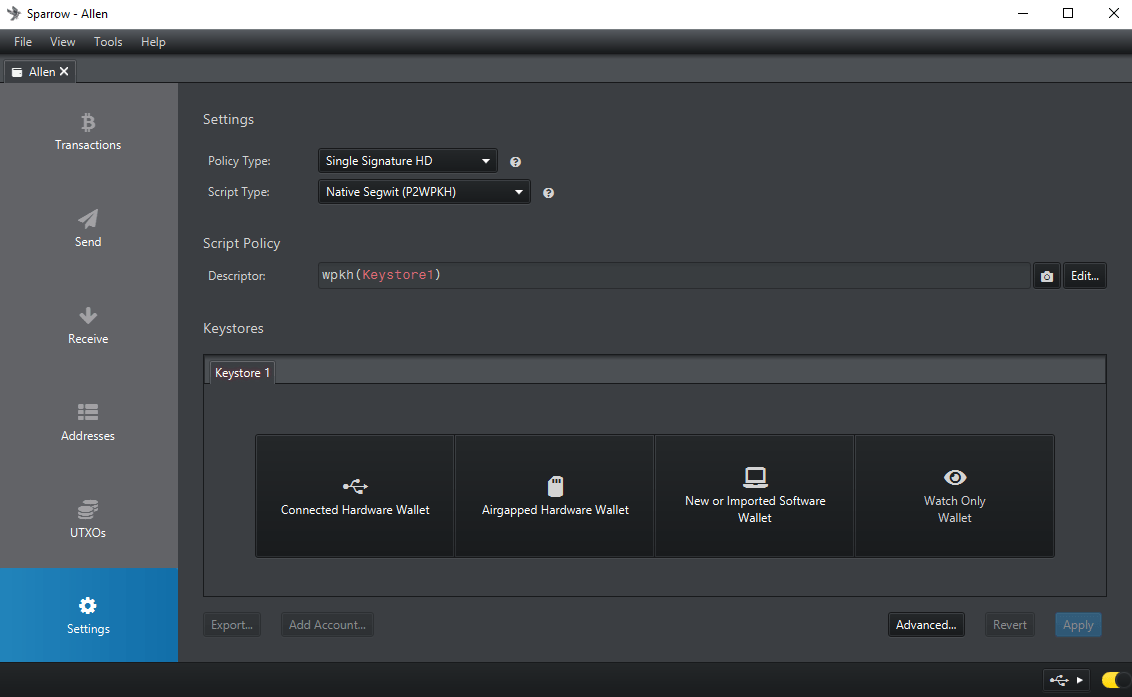
The interface is built around tabs: wallet accounts, transaction history, UTXO lists, a transaction editor, and address management, all accessible from one window. It is a lot to look at when you first open it. That density is the point. Every piece of information that most wallets bury or hide is surfaced here.
Sparrow can run as two different things at once. Used on its own, it stores encrypted private keys locally and works as a standard hot wallet. Connected to a hardware wallet, it becomes a watch-only coordinator where the private keys never enter the computer at all. Most people who use it seriously end up with both configurations running simultaneously: a small software wallet for day-to-day spending, and one or more hardware-backed accounts for the bulk of their holdings.
A few things it does not do: no Lightning Network built in, no altcoins, no built-in swap or exchange. For Lightning, users typically connect a separate node. For mobile access to the same wallet, BlueWallet can be set up as a watch-only companion using the xpub from Sparrow.

Hardware Wallet Support and Signing Workflows
Sparrow’s hardware wallet compatibility is wider than any comparable Bitcoin coordinator. Supported devices include Coldcard Mk4 and Q, all Trezor models, Ledger Nano X and Flex, BitBox02, Keystone Pro, Foundation Passport, SeedSigner, Blockstream Jade and Jade Plus, and Satochip.
USB connection works on most of these and is straightforward. Sparrow detects the device, imports the public key, and from that point can generate addresses, display balances, and build transactions. The private key stays on the hardware at all times.
Air-Gapped Signing
Some users go a step further and avoid USB entirely. Air-gapped signing means the device holding your private keys is never plugged into an internet-connected computer, not even once.
Sparrow supports two methods. For Coldcard Mk4, the process goes through a microSD card. Sparrow builds the unsigned transaction and saves it as a .psbt file to the card. The card moves to the Coldcard, which reads the transaction details on its own screen, lets you verify everything, and signs offline. The signed file goes back on the card, back into Sparrow, and gets broadcast. Nothing about the private key ever touched a networked machine.
For SeedSigner, Keystone, and Coldcard Q, the same exchange happens through animated QR codes instead. Sparrow displays the transaction as a looping sequence of QR frames on screen. The signing device scans them with its camera, signs, and shows a QR code back. Sparrow’s webcam reads it. No cable, no Bluetooth, no file transfer, nothing physically shared between the devices.
The underlying standard for both is PSBT, or Partially Signed Bitcoin Transaction. BIP174 defines a container format that holds the unsigned transaction, all the input data a signer needs to verify it, and any partial signatures already collected. Sparrow was built around PSBT from the start, which is why these workflows work cleanly rather than feeling bolted on.
Multisig
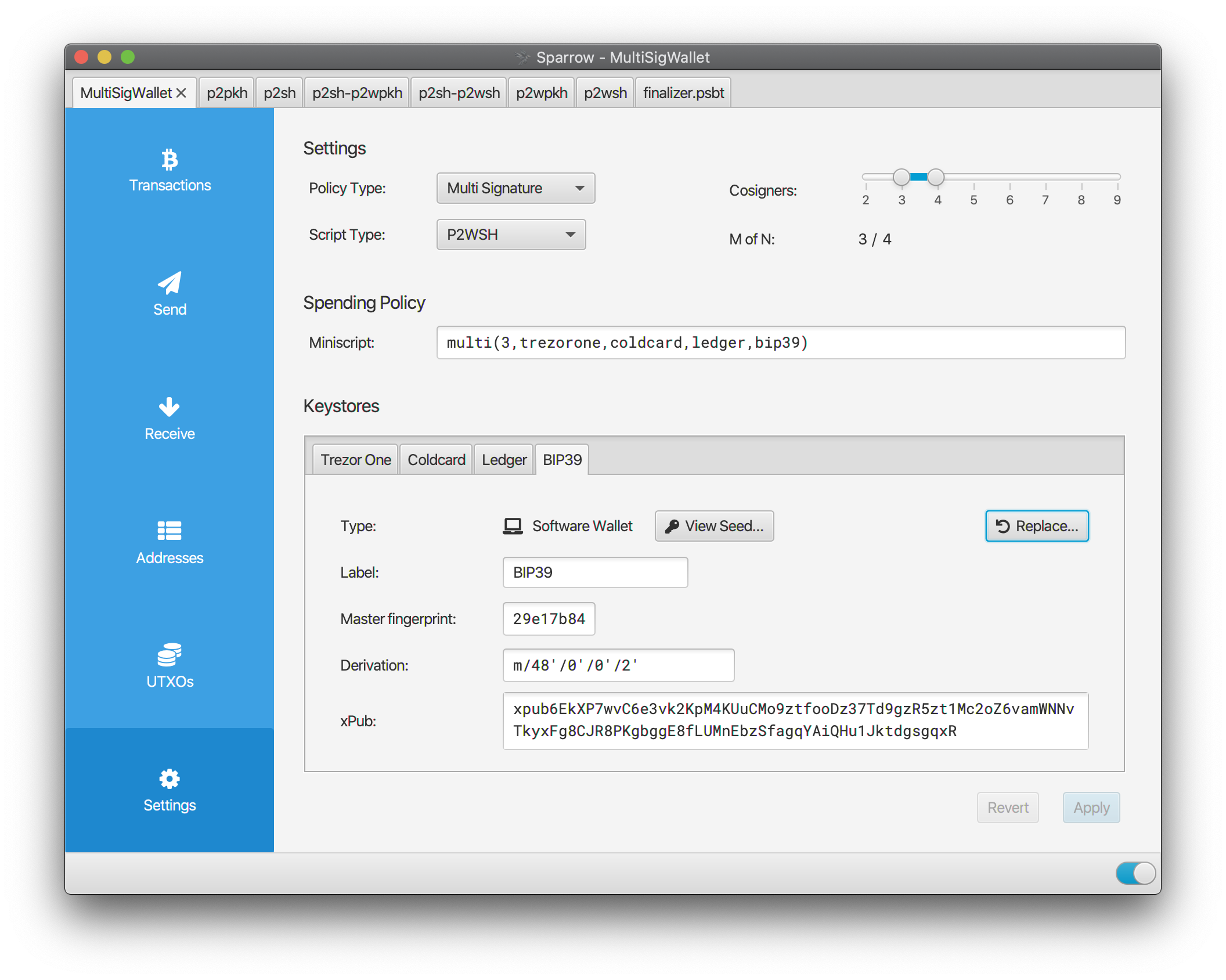
Sparrow handles any M-of-N multisig configuration. A 2-of-3 setup is the most common for personal use: three keys, any two required to sign. Using devices from different manufacturers, say a Coldcard, a Trezor Safe 5, and a Foundation Passport, protects against a single vendor’s firmware flaw compromising everything.
The BIP129 multisig backup standard is supported, so you can export the full wallet descriptor and recover the setup in another coordinator if needed. Not locked in.
UTXO Management and Transaction Control
Bitcoin does not work like a bank balance. What you actually hold is a collection of unspent transaction outputs, each one a discrete amount received at a specific address from a specific transaction. When you make a payment, you select some of those outputs as inputs and produce new ones.
Most Bitcoin software manages this in the background and shows you only the total. Sparrow puts every UTXO in front of you.
Each output in your wallet appears in a list with its amount, address, confirmations, and any label you have applied. You can tag each one to track where it came from, whether that is a KYC exchange withdrawal, a peer payment, or a change output from an earlier transaction. You can freeze individual UTXOs to keep them from being accidentally included in future transactions. And when you build a payment, you can manually select exactly which ones to include.
That last part has real privacy consequences. If you receive Bitcoin from a regulated exchange and later receive some from a private sale, combining both in a single transaction links them on-chain. Anyone watching can infer they belong to the same person. Keeping them separate avoids that. Sparrow makes this easy to manage. Most wallets do not give you the option at all.
Transaction construction comes with a visual diagram of inputs and outputs that updates in real time as you make choices. Coin selection runs on Branch and Bound and Knapsack algorithms, the same ones used in Bitcoin Core. They minimize unnecessary change outputs, which reduces future fees and keeps your UTXO set from getting cluttered.
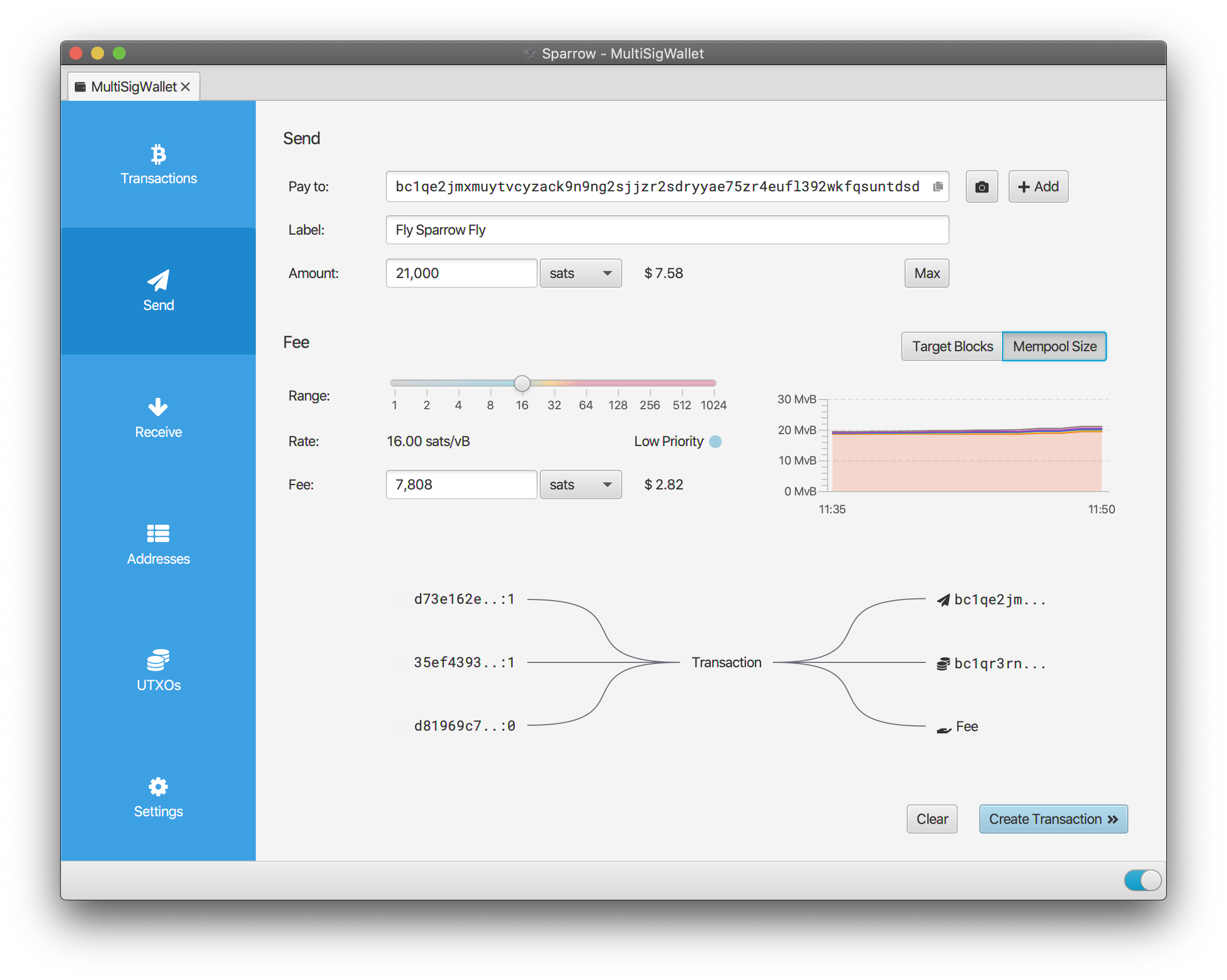
Fee estimation is live. There is a chart showing current mempool fee rates by block target, so you can see exactly what it costs to get confirmed in one block versus waiting for a quieter period. If a transaction goes out and gets stuck, both RBF and CPFP are available. RBF replaces the original transaction with a higher-fee version. CPFP creates a child transaction that incentivizes miners to confirm the parent.
The transaction editor doubles as a local blockchain explorer. Load any transaction by ID or raw hex and Sparrow will display every input, output, and linked address. You can follow inputs back through history to the coinbase transaction if you want. All of that happens locally, with no queries sent to a public block explorer.
Security
No private key or seed phrase is transmitted to any server. Sparrow has no backend. Keys for software wallets are stored in local encrypted files. When signing is needed, the key is decrypted in memory for the duration, then discarded. It is not written to disk unencrypted.
The encryption method is worth paying attention to. Most wallet software uses PBKDF2 for password hashing. PBKDF2 is fast by design, which makes it practical across many device types but also makes brute-forcing a stolen wallet file cheaper. Sparrow uses Argon2, which won the Password Hashing Competition in 2015 and is designed for exactly the opposite trade-off: it is memory-hard and time-consuming. The configuration used requires at least 500ms on modern hardware just to derive the decryption key. That does not sound like much until you consider what it means for someone running millions of guesses per second.
Sparrow encrypts watch-only wallet files too, not just full wallets. An xpub reveals your complete address history and current balance to anyone who gets hold of it. It deserves real protection.
Releases are signed with Craig Raw’s GPG key, with the fingerprint published on the download page. You can verify the binary before installing.
Privacy
Sparrow lost Whirlpool. That is the honest starting point for any privacy discussion. The tools that remain are still meaningful for most use cases, just not the same as having a built-in CoinJoin coordinator.
Tor is built in natively. When enabled, all server traffic routes through the Tor network. Your IP address stays separate from your wallet activity.
Coin control and UTXO labeling are probably the most practical privacy features here for everyday use. Tracking where each UTXO came from and being deliberate about which ones appear together in a transaction is a simple way to prevent chain analysis tools from clustering your addresses. It requires attention, not extra software.
PayNym is Sparrow’s implementation of BIP47 reusable payment codes. You share your PayNym once, the sender links to it with a one-time 546-sat notification transaction, and after that every payment between you and that contact uses a fresh private address. Neither party needs to exchange new addresses for each payment, and nothing about the receiving address is visible on-chain to observers. It works across any wallet with BIP47 support.
PayJoin receiver support is a more recent addition. In a PayJoin transaction, the receiver contributes an input alongside the sender, which breaks the basic chain analysis assumption that all inputs belong to one person. It needs both parties online and using compatible software, so it is not always practical, but it is there.
Server Connection and the Privacy Ladder
How Sparrow fetches your transaction history determines how much of your wallet activity third parties can see.
Public Electrum servers are the default for new installs. They are fast to set up and ask nothing of you, but the server operator can see every address you query. Fine for testing or small amounts. Not great for anything you care about long-term.
Running your own Electrum server, using Fulcrum, ElectrumX, Electrs, Electrs-Esplora, Electrum Personal Server, or BWT, is the next step. Your addresses stay private. These all connect over SSL and are routable through Tor.
A direct Bitcoin Core connection is the most private setup. Sparrow connects via RPC to your full node. Your node validates everything independently, and nothing about your wallet activity leaves your local network. Sparrow’s documentation also includes a performance comparison across the major Electrum server implementations, which is useful if you are deciding which one to run.
Pros and Cons
Who It Suits
Sparrow works well for Bitcoin holders who want hardware wallet self-custody with proper coin control, people building or moving into multisig, and anyone stepping up from a custodial exchange or a simpler wallet like Ledger Live. It is also the most practical option right now for recovering Samourai Wallet funds, since Sparrow can import Samourai wallet structures including Whirlpool account types.
It is not well-suited for complete beginners with no interest in learning how Bitcoin transactions work. The interface rewards understanding. For users who just want to receive and send without thinking about UTXOs, it will feel like overkill. Someone who needs mobile access to their Bitcoin should also look elsewhere, at least for that part of their setup.
FAQ
Is Sparrow Wallet safe?
Sparrow is non-custodial and open-source. Private keys are never transmitted anywhere, and they are stored locally using Argon2 encryption. Paired with an air-gapped hardware wallet, your keys never touch an internet-connected machine at all. As with any non-custodial wallet, the security of your seed phrase is your responsibility.
Does Sparrow still support CoinJoin?
No. The Whirlpool integration was removed in version 1.9.0 after the Samourai shutdown in April 2024. Sparrow still has Tor, coin control, UTXO labeling, PayNym, and PayJoin, but there is no built-in CoinJoin. JoinMarket is the option most people use if they need that.
Which hardware wallets are supported?
Coldcard Mk4 and Q, all Trezor models, Ledger Nano X and Flex, BitBox02, Keystone Pro, Foundation Passport, SeedSigner, Blockstream Jade and Jade Plus, and Satochip. Most connect via USB; air-gapped setups use SD card or QR codes depending on the device.
Can you use Sparrow for multisig?
Yes. Any M-of-N configuration works, and combining hardware wallets from different vendors is straightforward. Wallet descriptors can be exported using the BIP129 standard, so the setup is recoverable in other coordinators without depending on Sparrow specifically.
Is it free?
Completely. No paid tiers, no subscriptions. It is funded by donations and developed under the Apache 2.0 open-source license.
Does it support Lightning?
No. Sparrow is on-chain Bitcoin only. Lightning requires a separate node.
Is there a mobile version?
No. Desktop only. BlueWallet can serve as a watch-only mobile companion if you import your xpub, but the wallet management itself stays in Sparrow.
Sparrow is not an easy wallet to walk into cold. The first session involves choices that other wallets make for you automatically: which server to connect to, which address type to use, how to label your UTXOs. That is by design. The wallet assumes you want to understand what is happening, not just see a balance and a send button.
For people who have been in Bitcoin long enough to care about those choices, this sparrow wallet review probably confirms what they already suspected. It is the most capable desktop option available, and the depth it offers is exactly the point.